You finish a part. It looks right. The proportions are clean, the CAD model is tight, and it solves the problem you were designing for. Then comes the question that stalls every designer at least once: is this actually manufacturable?
The honest answer is that there is no great place to get a fast, reliable, private answer to that question — and the cost of not having one shows up at the worst possible moment.
Where do product designers check if a design can be manufactured?
Product designers check manufacturability through four main routes: sending the file to a factory for a quote with DFM feedback, hiring a DFM consultant or manufacturing engineer, asking an AI assistant about design rules, and running a local geometry-analysis tool. Each option has a different speed, cost, and accuracy tradeoff. None is perfect for every stage of the design cycle — which is why the gap between fast iteration and accurate feedback is a real problem.
The real options, and their real gaps
Ask the manufacturer
The most accurate answer comes from the people who will actually make the part. But getting that answer has a catch: most factories will not perform a detailed DFM review until you request a formal quote. That round-trip, from sending the file to receiving markup on what needs to change, typically takes two to five business days. If you are iterating weekly or faster, waiting for factory feedback on every revision is not realistic.
There is also the exposure problem. Sending a STEP file to a factory you are not yet committed to means your geometry is on someone else's server. For early-stage work or designs with any IP sensitivity, that matters.
And the feedback format varies. Some shops mark up a PDF. Some send an email. Very few give you a structured report you can act on immediately in CAD.
A DFM consultant or manufacturing engineer
The most rigorous option is a person who does this professionally. An experienced manufacturing engineer or DFM consultant will catch things that software misses — material-specific edge cases, tooling constraints that vary by region or supplier, subtle geometric conditions that only matter at certain production volumes.
The gap here is not quality. It is availability. A consultant is not on-call for every design iteration. The engagement model does not fit fast-moving design work. And at typical consulting rates, running a DFM check on every version of a part before it is anywhere near final is simply not economical.
Ask ChatGPT or Claude
AI assistants know a lot about design for manufacturability. Ask about minimum wall thickness for injection molding and you will get a reasonable answer. Ask about draft angles for a given material and you will get useful rules of thumb. For DFM education, they are genuinely good.
But there is a structural limitation that does not get stated clearly enough: these models cannot open your STEP file and analyze the actual geometry.
A STEP file is a precise geometric database. Evaluating manufacturability requires estimating wall thickness from the part's shell geometry, measuring face normals to detect draft, analyzing topology for undercuts relative to a pull direction. These are geometric computations. A language model processes text. When you paste a STEP file's contents into a chat window, the model reads the entity definitions as text and responds with plausible-sounding feedback — but it has never seen your part. It has no idea what your actual wall thicknesses are, where your undercuts are, or which faces are missing draft.
The risk is not that AI gives you bad DFM rules. The risk is that it gives you confidence without geometric grounding. You submit a part thinking it has been checked, and the shop comes back with a list of specific locations where the geometry does not work.
Insight
ChatGPT is a good place to learn DFM principles. It is not a substitute for actual geometric analysis of your specific file, because it has no access to your file's geometry.
Design forums, Reddit, Discord
Community knowledge is real and often generous. Post a render or a drawing in the right forum and experienced engineers and machinists will sometimes catch issues a tool would miss.
But two problems limit this for regular use. First, the response is slow and variable — you might hear back in two hours or two days, and the quality depends entirely on who happens to see the post. Second, you are posting your design publicly. For anything with IP sensitivity, that is a non-starter.
The cost of not having a fast first-pass answer
Most DFM problems are not discovered during design. They surface at two particularly expensive moments.
The first is the quote call. You send a file to a shop, the shop comes back not with a price but with a list of manufacturing concerns. You now have to make revisions, re-send, and wait again. The delay compounds, especially if the shop and your timezone do not overlap.
The second is later: after a part has been through internal review, after stakeholders have seen it, sometimes after it has been communicated to a customer. Learning then that the geometry cannot be made as designed creates rework, schedule pressure, and sometimes project credibility damage.
The earlier a manufacturability issue is caught, the cheaper it is to fix. That is not a new principle. What is missing is a practical way to catch issues early across every design iteration, not just when a deadline forces a formal review.
Warning
The worst time to learn a part cannot be made is in a quote call or after you have presented it to a stakeholder. Early self-check is cheap. Late discovery is not.
Where a local first-pass self-check fits
None of the options above are wrong. A manufacturing engineer is the most thorough option; a factory quote is the most realistic; AI assistants are genuinely useful for learning. The gap is not in any of these tools individually. The gap is in what a product designer can do on their own, quickly, on every iteration, before involving any of them.
What would that look like? Something that runs on your computer without uploading your CAD files. Something that can compare your geometry against multiple process options — injection molding, CNC, die casting, 3D printing — and flag the specific issues your part has in each context. Something that gives you a structured report with locations, not just general advice. And something fast enough that running it on every version is not a burden.
That kind of first-pass self-check does not replace a manufacturing engineer. It does not replace a factory review. What it does is raise the quality of the part that reaches those reviews — so that the feedback you get is about things that actually matter, not about wall thicknesses you could have caught yourself in twenty minutes.
The designer-engineer split in DFM tooling
Most DFM tools on the market were built for engineers. They assume you work in an engineering organization, have access to manufacturing process data, and are comfortable with CAD-integrated analysis that surfaces in the same environment as your FEA and tolerance stack-up work.
Product designers — especially those working in smaller studios, early-stage startups, or consumer product contexts — often work differently. They move faster, they iterate more, they own the design but not always the manufacturing relationship. The tools that exist were not designed with that workflow in mind.
That is the gap Fabdose was built for. It is a desktop app for product designers, not engineers, that runs STEP and STP files locally on your Mac. In one to three minutes, it checks your part against a manufacturing process, flags draft angle, undercut, and process-fit issues with a 3D viewer that pins those at the specific locations in your model, reads wall thickness across the part as a whole for a variation-based warp-risk flag rather than a pinned location, and gives you a rough cost range. The free tier checks one process per analysis; the auto-comparison that runs your part across multiple processes side by side is a Pro feature.
Your CAD files are never uploaded — they stay on your computer. The geometry engine runs locally, which is also what makes the analysis fast; only the defect findings are processed by AI and synced to your account.
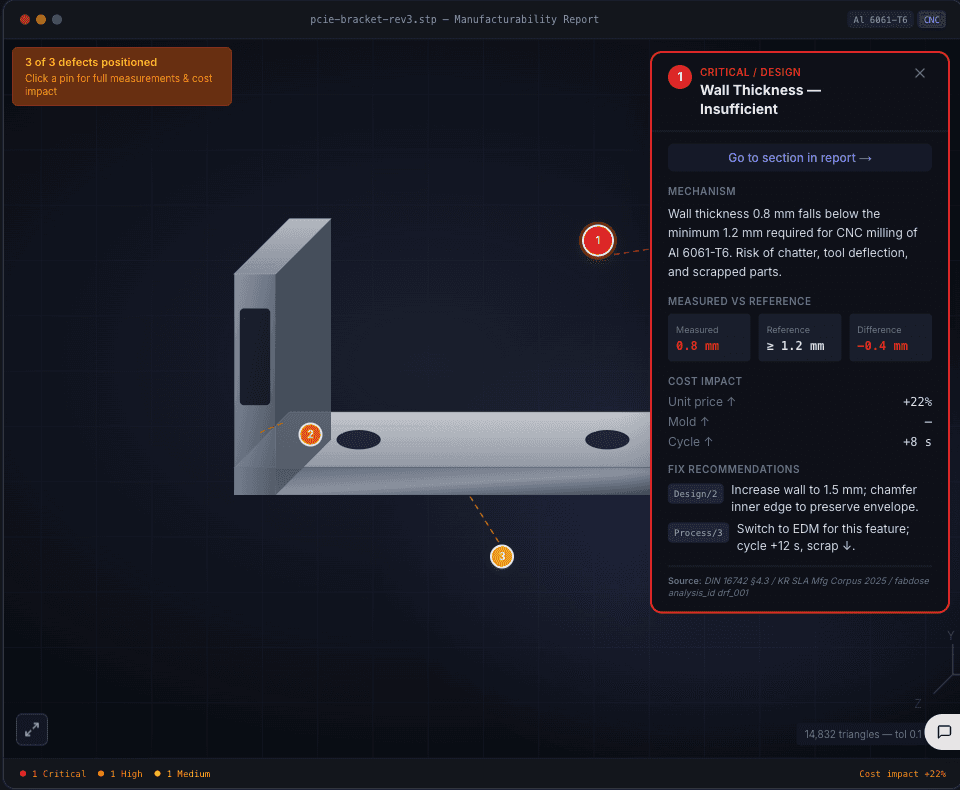
Fabdose is not a replacement for a manufacturing engineer. There are things a person with real manufacturing experience will catch that no first-pass tool will. The honest position is that Fabdose is the step before that — the self-check you run before you involve anyone else, so that when you do reach out to a shop or a consultant, you are bringing them a part that has already been through a first filter.
Tip
Your CAD files are never uploaded — your STEP and STP files stay on your computer throughout the analysis. The defect findings are processed by AI and synced to your account.
Summary
| Option | What it gives you | Honest gap |
|---|---|---|
| Factory / manufacturer | Most accurate real-world feedback | 2-5 day round-trip, requires formal quote request, file exposure |
| DFM consultant | Expert judgment with material and regional context | Not on-call for every iteration, cost per engagement |
| ChatGPT / Claude | Good DFM rules and education | Cannot open or analyze STEP geometry, gives confidence without grounding |
| Design forums / Discord | Community knowledge, sometimes catches edge cases | Slow, public, inconsistent |
| Local first-pass self-check | Fast, private, iteration-friendly | Not a substitute for expert review, rules-based not judgment-based |
The right answer for most product designers is all of these at the right stage. The self-check step belongs at the beginning of the chain, before the slow or expensive options, not as a replacement for them.
If you want to run that first-pass check on your own Mac before involving anyone else, Fabdose is free for five analyses. No credit card required.
Frequently asked questions
How long does it take to get DFM feedback from a factory?
Getting DFM feedback through a factory quote round-trip typically takes two to five business days. Some factories offer faster informal feedback, but a formal quote with a markup list of manufacturing concerns is usually a multi-day process. This timeline does not fit design iteration cycles shorter than a week.
Can AI assistants check if a STEP file is manufacturable?
No. AI language models — ChatGPT, Claude, and similar tools — cannot analyze STEP file geometry. They read the file's text content as entity definitions but cannot reconstruct the 3D shape, measure wall thickness, detect undercuts, or evaluate draft angles from that text. They provide DFM education and rules of thumb, not geometric analysis of your specific part.
Is it safe to send a STEP file to a factory before you are committed to working with them?
Sending a STEP file to a factory before a committed relationship means your geometry is on someone else's server. For early-stage designs or anything with IP sensitivity, this is a real exposure risk. Local geometry-analysis tools that do not upload your file address this by running analysis entirely on your computer.
What is a first-pass manufacturability check?
A first-pass manufacturability check is a geometry analysis of your STEP file that runs on your computer in one to three minutes and flags the most common manufacturing constraint violations — wall thickness under threshold, insufficient draft angle, undercut locations, and process-fit issues. It is not a substitute for a manufacturing engineer's judgment, but it catches rule-based geometry problems before the part reaches a shop or consultant.
Do I need CAD software installed to run a manufacturability check?
No. Tools like Fabdose analyze STEP files directly without requiring SolidWorks, Fusion 360, or another CAD application. You export a STEP file from whatever CAD tool you use and load it into the analysis app. The analysis does not depend on the originating CAD environment.
Check your STEP file on your own computer, before you send it anywhere. Five free analyses, no credit card.
Download Fabdose Free